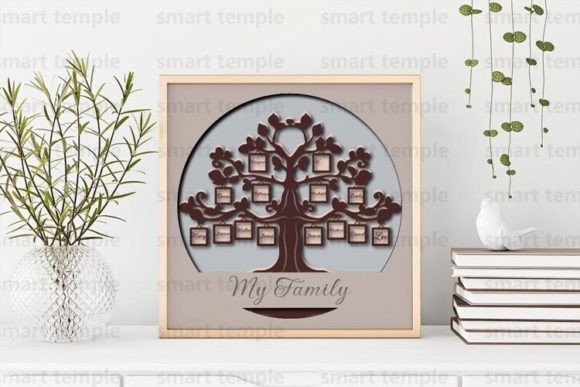
Bringing Your Ancestry to Life with a Family Tree 3D Shadowbox and SVG Files
There is something deeply satisfying about holding a physical representation of your history. In an era where most of our memories are trapped on hard drives or lost in the cloud, creating a Family Tree 3D Shadowbox offers a tangible connection to the past. Whether you are a hobbyist looking for a weekend project, a small business owner searching for a unique product to sell, or a teacher wanting to make genealogy come alive for students, digital design files have revolutionized how we craft. Specifically, utilizing a Family Tree SVG set designed for layering allows you to build depth, texture, and story into a single piece of wall art.
These digital assets are not just images; they are blueprints for creation. When you download a high-quality archive containing SVG, DXF, and AI formats, you are getting a versatile toolkit compatible with almost any modern cutting machine. From industrial CNC routers to home-friendly devices like the Cricut or Silhouette, these layered files bridge the gap between digital design and physical craftsmanship. The beauty of this approach lies in its adaptability. You aren't locked into one specific look or material. The same file can become a rustic wooden heirloom, a colorful classroom display, or a sleek modern decor piece, depending entirely on your vision and the materials you have on hand.
Choosing the Right Materials for Your Project
The magic of a 3D shadowbox happens in the layering, and the material you choose dictates the final aesthetic and durability. For those aiming for a traditional, warm feel, wood and plywood are the gold standards. A 3mm birch plywood cuts cleanly on laser machines and holds paint beautifully, allowing the grain to peek through if you prefer a natural finish. If you are using a CNC router, you might opt for slightly thicker hardwood to create a substantial, heavy-duty piece that feels like furniture rather than just decor.
However, wood isn't the only option. Cardboard and heavy paper offer a fantastic, low-cost alternative that is perfect for prototyping or educational settings. If you are working with children or testing a color scheme before committing to expensive timber, cutting a few layers from cardstock gives you an immediate preview of the depth and shadow effects. Paper projects also allow for intricate details that might be too fragile for wood, enabling delicate filigree work around the names and dates of your ancestors. Regardless of the medium, the process remains consistent: cut, assemble, and finish.
Once your layers are cut, the finishing touches bring the piece together. Using acrylic paint is generally the most effective method for sealing and coloring these projects. Applying 3 to 4 coats ensures full coverage, especially on porous materials like raw wood or cardboard. This step is crucial because it hides cut marks and unifies the layers, making the text and branches pop against the background. You can go for a monochromatic look for a modern vibe or use different shades for each generation to visually distinguish the timeline of your family history.
Real-World Applications Beyond Home Decor
While hanging a finished shadowbox on your own wall is a rewarding personal achievement, the utility of these Family Tree SVG files extends far beyond personal DIY projects. Consider the perspective of a small business owner or an entrepreneur on platforms like Etsy. Handmade, personalized gifts are perpetually in demand, particularly for weddings, anniversaries, and reunions. By purchasing a commercial-use license for these designs, you can produce finished products to sell. You aren't just selling a cut piece of wood; you are selling a customized narrative. A client provides the names and dates, you handle the cutting and painting, and the result is a high-value item that commands a significant markup compared to the cost of materials.
Educators and homeschooling parents also find immense value in these resources. Genealogy is often taught as a dry list of names in a textbook. Transforming that lesson into a hands-on activity where students cut, paint, and assemble their own family trees changes the engagement level entirely. It turns abstract history into a concrete artifact. In a community center or senior living facility, organizing a workshop where residents build these shadowboxes can serve as both a cognitive exercise and a way to preserve oral histories. The act of assembling the layers while discussing the people represented fosters connection and memory retention.
For event planners and bloggers, these shadowboxes make for stunning visual props. A large-scale version created from foam board or thick plywood can serve as a centerpiece at a family reunion or a wedding reception, inviting guests to trace their lineage during the event. Content creators can document the "build process" for social media, tapping into the massive maker community that loves time-lapse videos of laser cutting and painting. The visual appeal of the layered depth makes for highly shareable content, driving traffic and engagement for those looking to grow their online presence.
Navigating File Formats and Customization
One of the most common concerns for users new to digital crafting is file compatibility. A robust design package will typically include SVG, DXF, and AI files to cover all bases. The SVG format is universally accepted by web-based cutting software like Cricut Design Space and Silhouette Studio. The DXF format is essential for users operating CNC machines or older CAD software, ensuring precision in vector paths. Meanwhile, the AI (Adobe Illustrator) file is perfect for graphic designers who need to make significant edits to the layout before sending it to a cutter.
The ability to edit and resize these files is a critical feature. Perhaps you have a specific wall niche that requires a narrower but taller tree, or maybe you want to create a miniature version for a gift box. Because these are vector files, you can scale them up or down without losing resolution or clarity. You can also rearrange elements if you wish to add extra branches for a larger family or remove layers to simplify the design for a quicker project. This flexibility ensures that the design serves your needs, rather than forcing you to adapt your space to the design.
It is important to remember the licensing terms associated with these digital goods. Typically, you are free to sell the finished physical product you create. This means if you cut, paint, and frame the tree, that object is yours to monetize. However, reselling the digital files themselves or posting them on other websites for download is strictly forbidden. This protects the intellectual property of the original designer while still allowing you to profit from your labor and creativity. Always respect these boundaries to support the ecosystem of digital creators.
Getting Started and Troubleshooting
Starting your project is straightforward once you have downloaded the archive. After extracting the files, open the format that matches your machine's software. Before committing to your final material, it is highly advisable to do a test cut on a scrap piece of the same thickness. This helps you dial in the power and speed settings of your laser or the pressure settings of your blade cutter. Different batches of plywood or varying densities of cardboard can react differently, and a test run saves you from ruining your primary materials.
If you encounter issues—perhaps your machine doesn't recognize the file type, or you need a specific modification to accommodate a unique framing style—don't hesitate to reach out to the designer. Many creators are willing to help if you cannot find a file format that suits your specific setup or if you need a custom adjustment. This direct line of communication can be invaluable, especially for complex projects where precise alignment of layers is necessary to achieve the desired 3D effect.
Ultimately, creating a Family Tree 3D Shadowbox is about more than just following instructions; it is about curating a legacy. Whether you are building it to honor your ancestors, teaching the next generation about their roots, or building a business around personalized crafts, these SVG layers provide the foundation. With the right materials, a bit of paint, and your own creative touch, you can transform a simple digital download into a cherished heirloom that tells a story for generations to come.